
AI in post-production
Can AI Actually Edit a Wedding Film? What It Gets Right and Wrong
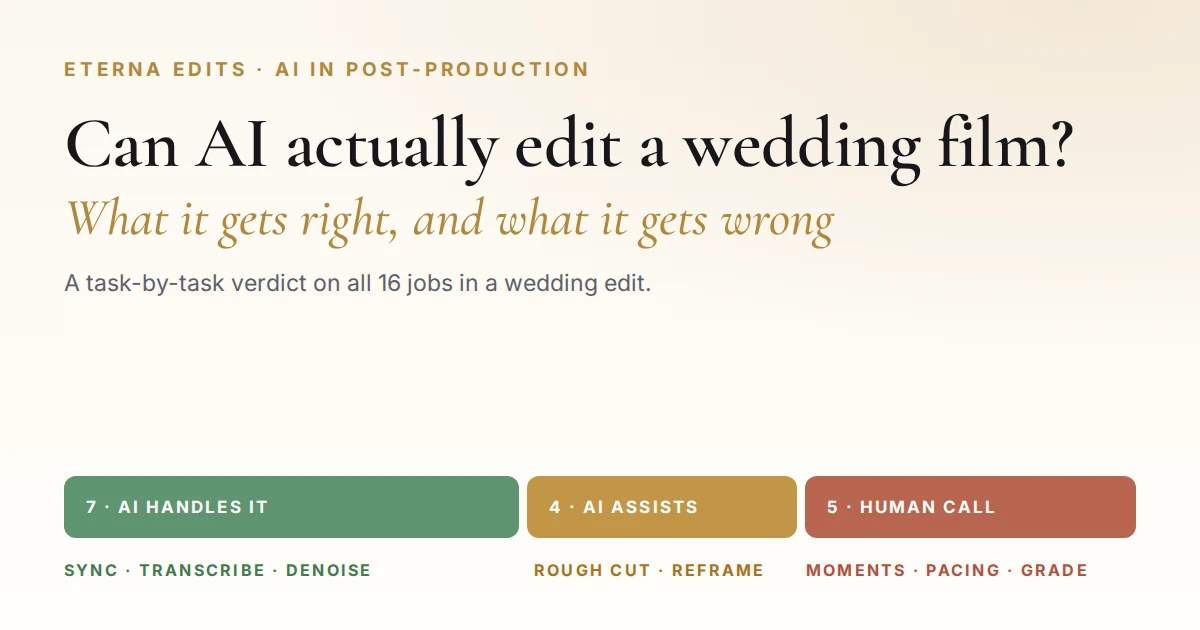
Feed a wedding into an AI editor and ninety seconds later you get a film. It’s sharp, it’s in sync, it’s cut to the music — and the bride’s mother, crying in the third row, isn’t in it. That’s the whole story of AI wedding video editing in one sentence: it nails everything you can measure and misses everything that matters. Eterna Edits handles wedding video editing for US videographers and studios every week, so here’s our task-by-task verdict on all 16 jobs in an edit.
Eterna Edits Editorial Team·AI in post-production·9 min read
The short answer
AI can edit a wedding video, but only part of one. It reliably handles the mechanical half of the job — multicam sync, transcription, clip search, audio cleanup, stabilization and a rough cut. It cannot choose which moments carry the story, how long to hold a shot, or where a cut should land. AI assembles a wedding film; creative judgement finishes it. Eterna Edits runs that split on every wedding we cut for US videographers and studios.
Key takeaways
- AI wins 7 of the 16 jobs in a wedding edit outright. Sync, transcription, speech isolation, stabilization, denoise, captions — faster and more consistently than a person, every time.
- Creativity is the first thing it leaves behind. AI scores shots on sharpness, stability and smiling faces. The shots that make a wedding film score badly on all three.
- Five jobs are still human-only. Moment selection, speech trimming, pacing, music choice and the final grade are judgement calls, and judgement is what AI hasn’t solved.
- The time saving is real but oversold. AI compresses about 30% of the edit. The 60–80% figures circulating online don’t trace to any study we could find.
- Most US studios land on a split. AI for the prep, a professional editor for the story — which is exactly how Eterna Edits works. Where we fit →
What can AI actually do in wedding video editing?
AI handles the mechanical layer of a wedding edit well: it syncs multicam angles, transcribes vows and speeches, finds clips by what was said, isolates speech from room noise, stabilizes handheld, denoises dark receptions and generates captions. On those seven jobs it beats a human for speed and consistency.
Arguments about AI editing go nowhere because people mean different things by “editing.” Split a wedding edit into its four layers and the picture gets clear fast.
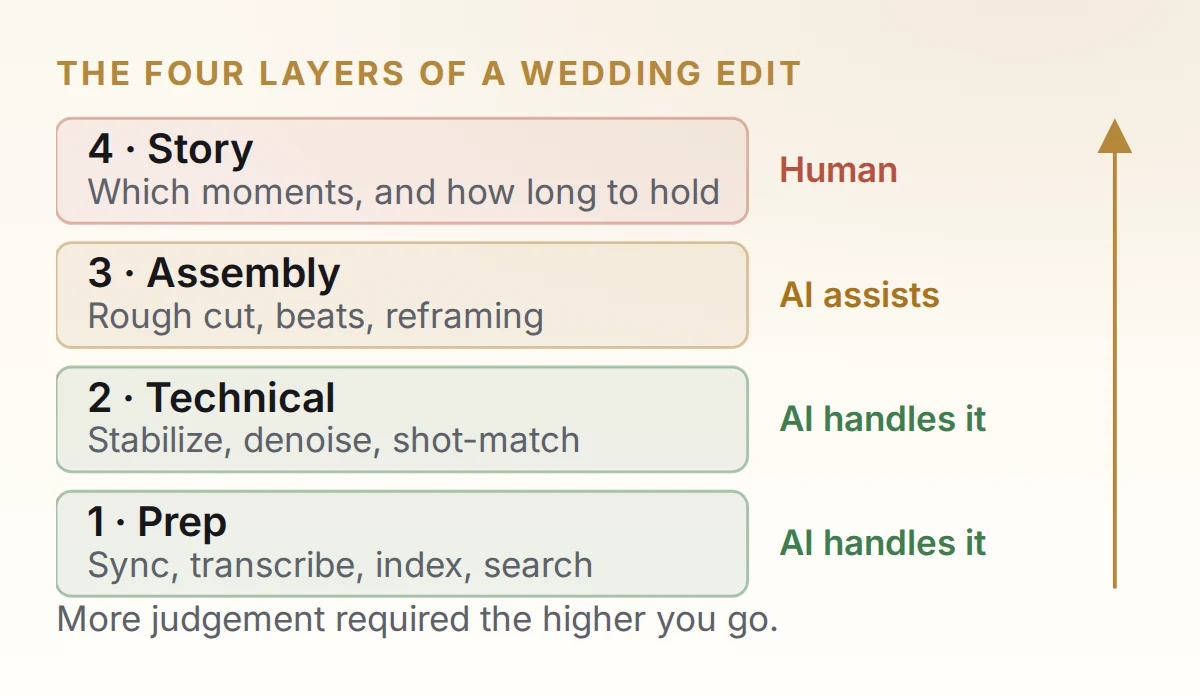
Layers 1 and 2 are mechanical. They have right answers — a clip is either in sync or it isn’t. That’s exactly the kind of problem machine learning is built for. Layers 3 and 4 have no right answer: three editors given the same footage make three different films, and all three can be good. There’s nothing to optimize toward, which is why progress there has been so much slower.
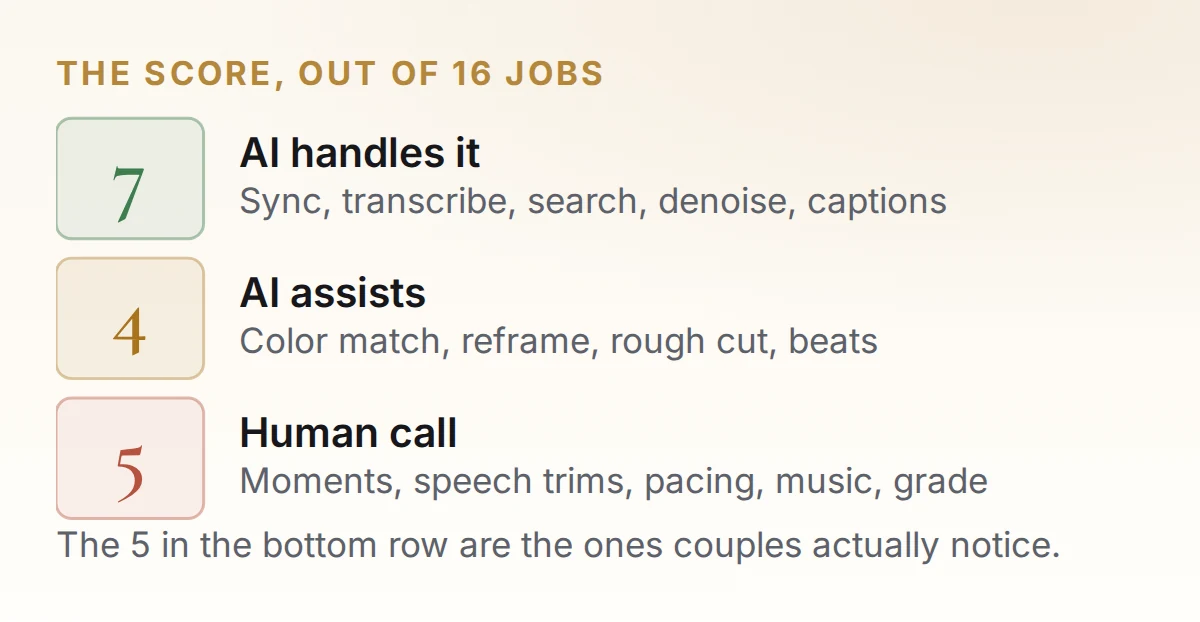
Here is every job in a wedding edit, scored. This is the table most “can AI edit a wedding video” articles never give you.
- ● AI handles it
- ● AI assists
- ● Human call
| Job in the edit | Verdict | What actually happens |
|---|---|---|
| Syncing multicam angles | AI handles it | Waveform matching across three cameras takes seconds and beats eyeballing a clap. |
| Syncing lav and recorder audio | AI handles it | Same job, same reliability. One of the oldest automated tasks in post and still one of the best. |
| Transcribing vows and speeches | AI handles it | Near-verbatim on clean audio. Accents and overlapping talk still cause errors. |
| Finding a clip by what was said | AI handles it | Type a phrase, get the timecode. Replaces the most tedious hour of any wedding edit. |
| Stabilizing shaky handheld | AI handles it | Shots that used to go straight to the bin are now usable. Pushes in slightly, so leave headroom. |
| Removing room noise, isolating speech | AI handles it | The biggest genuine leap of the last three years. Outdoor vows over wind are recoverable. |
| Generating subtitles and captions | AI handles it | Styled, timed, burnt in. A proofread is still worth five minutes. |
| Matching shots to one color baseline | AI assists | Balances exposure and white balance well. Skin tones under mixed lighting still need you. |
| Reframing 16:9 to vertical | AI assists | Tracks the subject reliably. Loses the second person in a two-shot, which on a wedding is often the point. |
| Building a rough cut | AI assists | A transcript-driven string-out saves real hours — as a starting point, not a cut. |
| Cutting to the beat of a track | AI assists | Beat detection is accurate. Knowing which beats to ignore is the actual skill. |
| Choosing which moments make the film | Human call | Requires knowing who everyone is and what the day meant. No tool has this information. |
| Trimming a 40-minute speech to 90 seconds | Human call | You're cutting for one punchline and one turn. AI cuts for clean sentence boundaries. |
| Pacing and shot duration | Human call | Holding two seconds too long is sometimes the whole shot. AI has no reason to hold. |
| Choosing the music | Human call | Track choice sets the emotional register, and it has to match these people, not the genre. |
| The final creative grade | Human call | Matching shots is technical. Deciding the film should feel warm and slightly faded is not. |
Read the verdict column and the pattern is obvious. Everything AI wins has a measurable right answer. Everything it loses is a creative preference. That isn’t a temporary gap in the technology — it’s a description of what the two kinds of work are.
From our edit bay
All seven of those AI jobs run on every wedding that comes into Eterna Edits before an editor opens the timeline. We work in Premiere Pro, After Effects, DaVinci Resolve and Final Cut Pro, so feature names change with the project files — but the passes don’t. By the time one of our editors starts choosing moments, none of that is still on the table.
Limitations of using AI in wedding video editing
The limitations of AI wedding video editing all come from one gap: AI has no idea who anyone is. It can’t tell the bride’s father from a caterer, so it can’t know which shot matters. That single blind spot produces five recurring failures — lost creativity, wrong moment selection, mechanical music sync, badly trimmed speeches and flattened skin tones.
Creativity is the first thing AI leaves behind
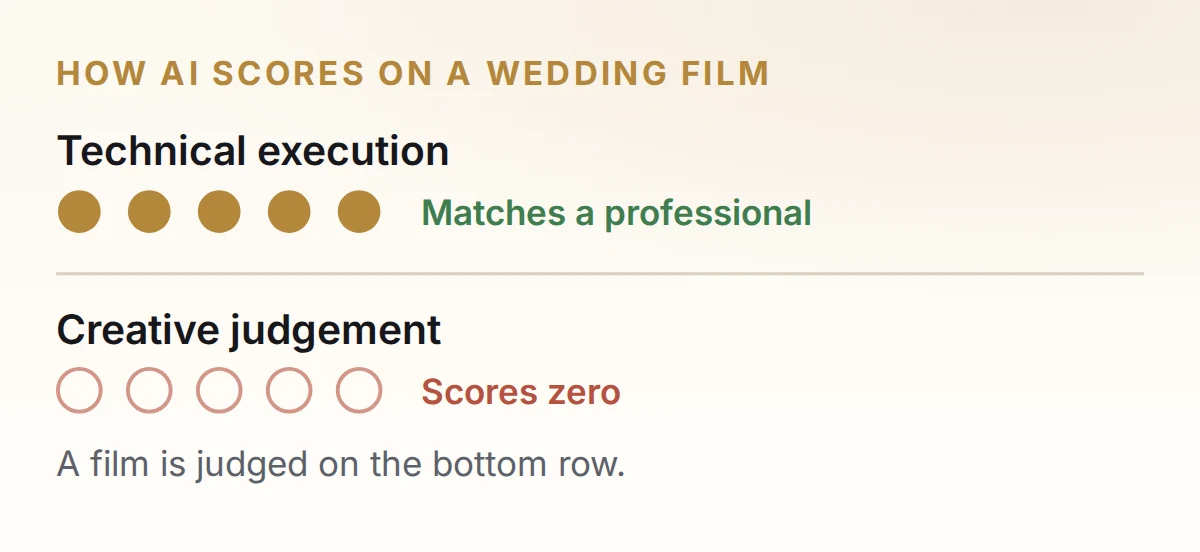
This is the limitation that matters most, and the one tool marketing never mentions. A wedding film is a creative decision wearing technical clothes. Which three seconds of a forty-minute speech. Whether to cut on the laugh or hold through it. Whether this couple’s film should feel warm and nostalgic or bright and fast. None of those have a correct answer, so none of them can be computed.
AI doesn’t make bad creative choices. It makes no creative choices — it applies the average of everything it was trained on. That’s why AI-edited wedding videos share a family resemblance: same pacing, same build, same drop on the chorus. Competent, interchangeable, and forgettable.
It picks the prettiest shot, not the one that matters
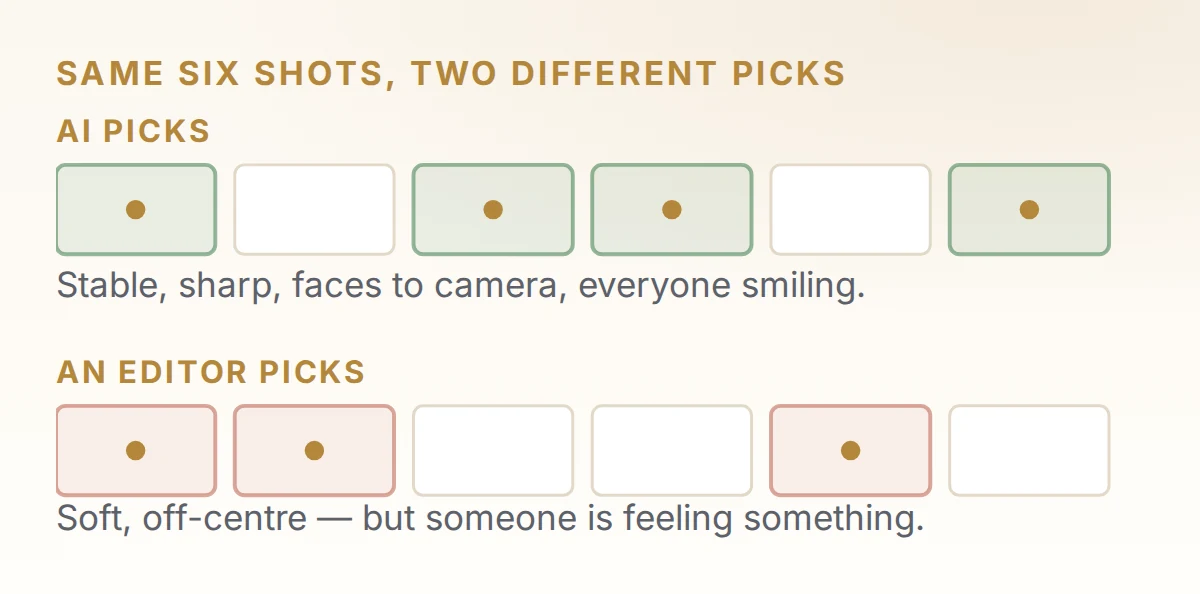
Asked for the best moments from a reception, AI returns stable, sharp, well-lit frames of people smiling at the camera. What it skips is the groom’s mother watching from the side of the room — she isn’t smiling, isn’t centered, isn’t in focus. In a wedding film that shot is often worth more than the five it chose.
It cuts on the beat, not on the meaning
Beat detection works. The problem is that a good wedding edit ignores the beat constantly — it holds through a bar because somebody is about to laugh, and cuts early because the next shot answers the last one. AI cuts on every beat because the beat is the only signal it has. The result is rhythmically correct and strangely relentless. That difference is almost entirely what separates a cinematic edit from a traditional one.
It trims speeches by sentence, not by story
Ask AI to cut a best man’s speech to 90 seconds and it keeps the cleanest, most complete sentences. But a speech works through setup and payoff — the joke in minute six only lands because of a throwaway line in minute one. AI keeps the joke and cuts the setup, because the setup reads as filler in isolation. It isn’t.
It flattens skin tones under mixed lighting
Automatic shot matching gets exposure and white balance consistent. It does much worse when one reception has warm string lights, a cool LED uplight wash and a window of daylight — the case where color correction stops being automatic — which describes most of them. AI averages toward a neutral that makes everybody slightly waxy. Getting skin right across that mix is still hand-graded work, and wedding color grading remains one of the clearest places a human pass shows.
Generated shots are a risk, not a feature
Generative tools are now built into the software you already own. Adobe’s Generative Extend adds frames to the start or end of a clip; Resolve’s AI Set Extender fills frame from a text prompt. Useful — but neither comes with guidance on when to stop. Here’s a workable line.
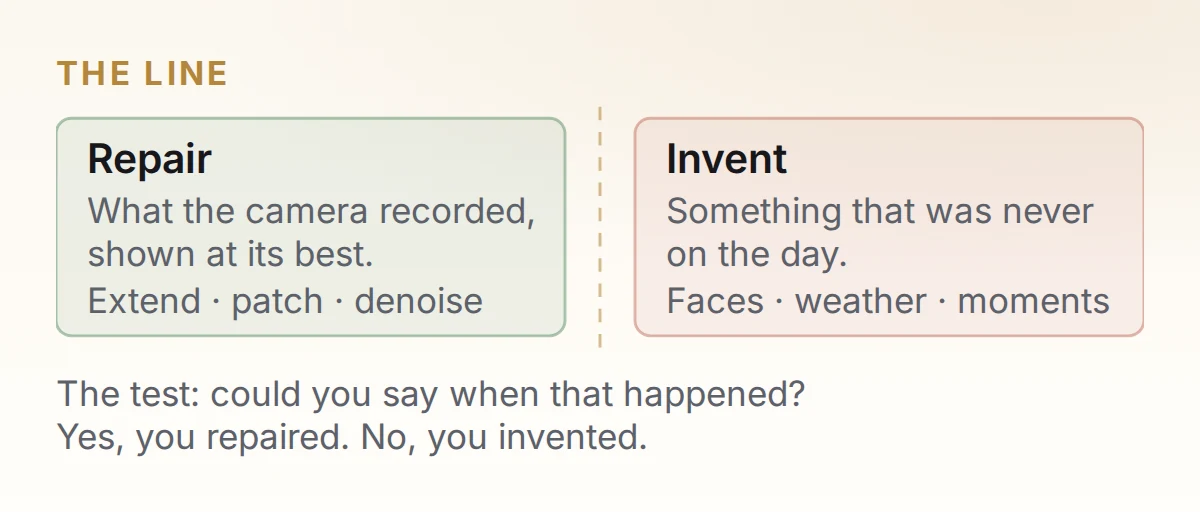
The practical test: if the couple asked “when was that?”, would you have an answer? If yes, you’re repairing. If no, you’re inventing — and couples are now primed to spot AI-generated wedding content, so a film that feels slightly too polished reads as fake even when it isn’t.
Our policy
Eterna Edits uses AI to repair footage, not to generate it. We’ll extend a shot by a few frames to save a cut, clean up audio, denoise a dark reception and patch out a distraction. We won’t generate a moment, alter a guest’s face or fabricate coverage. We work white-label, so the film goes out under your studio’s name — that makes this your reputation, which is exactly why we’d rather the line be explicit than assumed.
AI wedding video editing vs. professional wedding video editing
AI wedding video editing is fastest and cheapest but produces a generic film with no creative direction. Professional wedding video editing produces a film built around one couple, but costs more and takes longer. Combining them — AI on the mechanical layers, a professional editor on the story — is what most US studios now run.
| What you need | AI editing | Professional editing | AI + a professional editor |
|---|---|---|---|
| Time to a first cut | Minutes | Days | Hours |
| Creative direction | None — applies an average | Decided per couple | Decided per couple |
| Choosing the moments | Measurable proxies only | Full context | Full context, found faster |
| Music and pacing | Cuts on every beat | Intentional | Intentional |
| Mixed-lighting skin tones | Averaged, often waxy | Hand-graded | Hand-graded, cleaner start |
| Consistency across 30 weddings | Perfectly consistent | Varies with fatigue | Consistent and considered |
| "Can we see more of my dad?" | Can't — doesn't know him | Straightforward | Straightforward and fast |
| Cost per film | Lowest | Highest | Between the two |
| Risk | A film nobody rewatches | A backlog in peak season | Depends who you pick |
How much time does AI actually save?
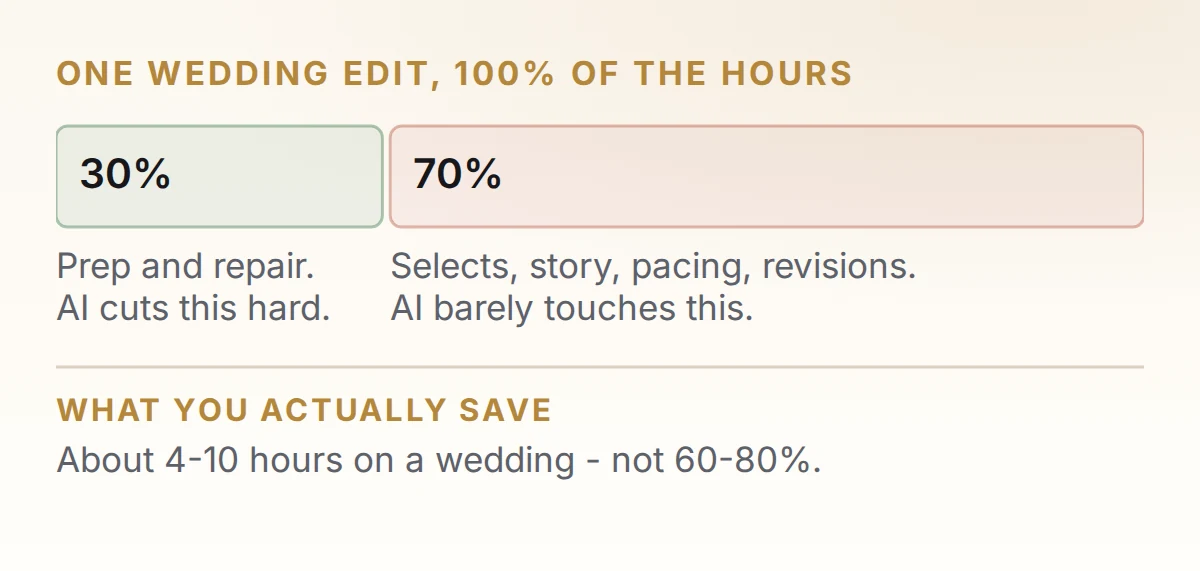
Less than you’ve been told. AI collapses ingest, sync, transcription and technical repair — about 30% of a wedding edit — and barely touches selects, story and refinement, which is where the hours live.
Be skeptical of the statistics on this topic. Search “AI wedding video editing” and you’ll hit confident figures — “92% of professional wedding videographers use AI”, “AI handles 63% of routine wedding video tasks”, “18 hours down to 3.5”. We went looking for the studies behind them and found none: no methodology, no sample, no named source. We’re not quoting them, and we’d suggest not quoting them to your clients either.
From our edit bay
A full wedding highlight film runs 25 to 65 hours of editor time at Eterna Edits, depending on footage volume, deliverables and revision rounds — the range we publish on our wedding editing service page. What AI changed is the shape of those hours, not the total. The prep collapsed; the story work didn’t move at all — and the story work is what a studio is paying us for.
How wedding videographers can combine AI with professional editing
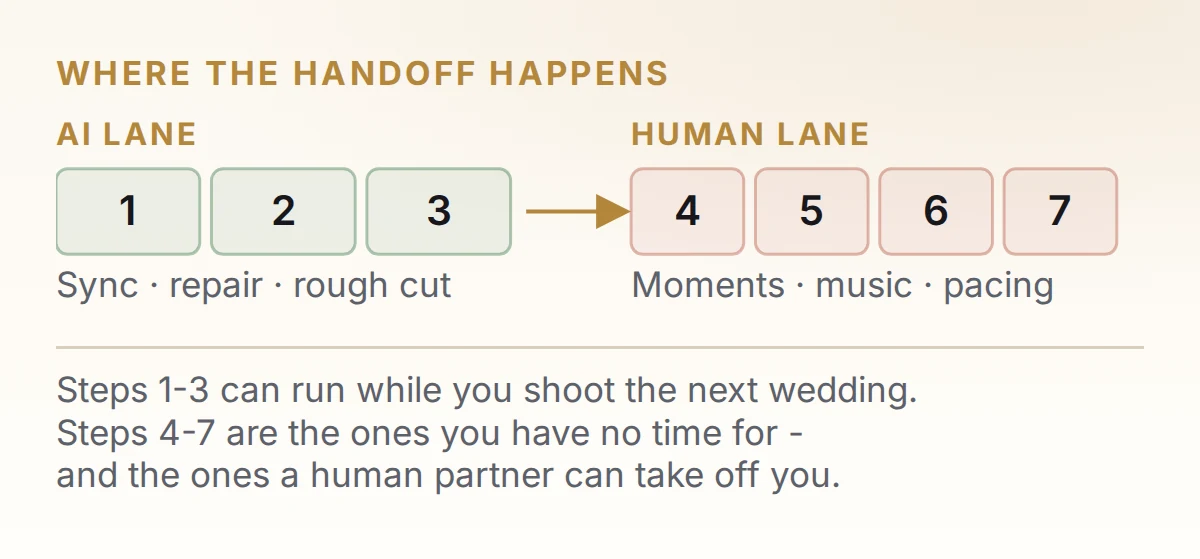
Run AI through the first three stages and a professional editor through the last four. AI gets you to a synced, searchable, cleaned-up rough cut in minutes; a person then chooses the moments, picks the music, sets the pacing and grades the film.
Let AI sync and index everything
All angles, all audio, transcribed, before you look at a single frame. You should arrive at footage you can search by sentence rather than footage you have to watch.
Run the technical passes up front
Stabilization, denoise, speech isolation, a first shot-match. Doing this before selects means you judge shots on content rather than writing them off for being shaky — though a solid shot list on the day still beats rescuing frames in post.
Generate a rough cut, then treat it as raw material
Let the tool build the assembly, then open it expecting to replace most of it. Its value is that it puts usable options on a timeline, not that it made good choices.
Pick the moments yourself — this is the film
Go through the transcript and the selects and choose what's in. This is the one stage where handing off to a tool costs you the deliverable. If you're short on time, cut somewhere else.
Choose the track, then set the pacing by hand
Music sets the structure, so pick it early — our list of songs that work in wedding videos is a starting point. Let AI mark the beats, then ignore the ones that fight the footage. The difference between a competent film and one they rewatch lives in the last 15%: an extra second on a reaction, a hold through the laugh, and a running time that follows the story rather than a target.
Grade and mix with AI as a starting point
Let auto-balance and the auto-mix reach a neutral baseline, then grade for the feel you want and ride the dialogue by ear.
How we run it
This is Eterna Edits’ actual workflow, not a generic one. A US studio sends us footage and context; steps 1–3 run as automated passes; one of our wedding video editors then does 4–6 by hand. You get the film back under your own brand with up to three revision rounds and your project files, so nothing locks you in.
We ask for context with the footage, not just the footage — who’s who, what mattered, which guests travelled. AI can’t use that information. A human editor can’t work properly without it.
Should you use AI or outsource your wedding video editing?
Use AI alone when there’s no story decision to make — raw ceremony edits, speech reels, same-day teasers and social cutdowns. Outsource to a professional editing studio when the deliverable is the film the couple paid for. Companies like Eterna Edits run both halves together: AI on the prep, human editors on the story.
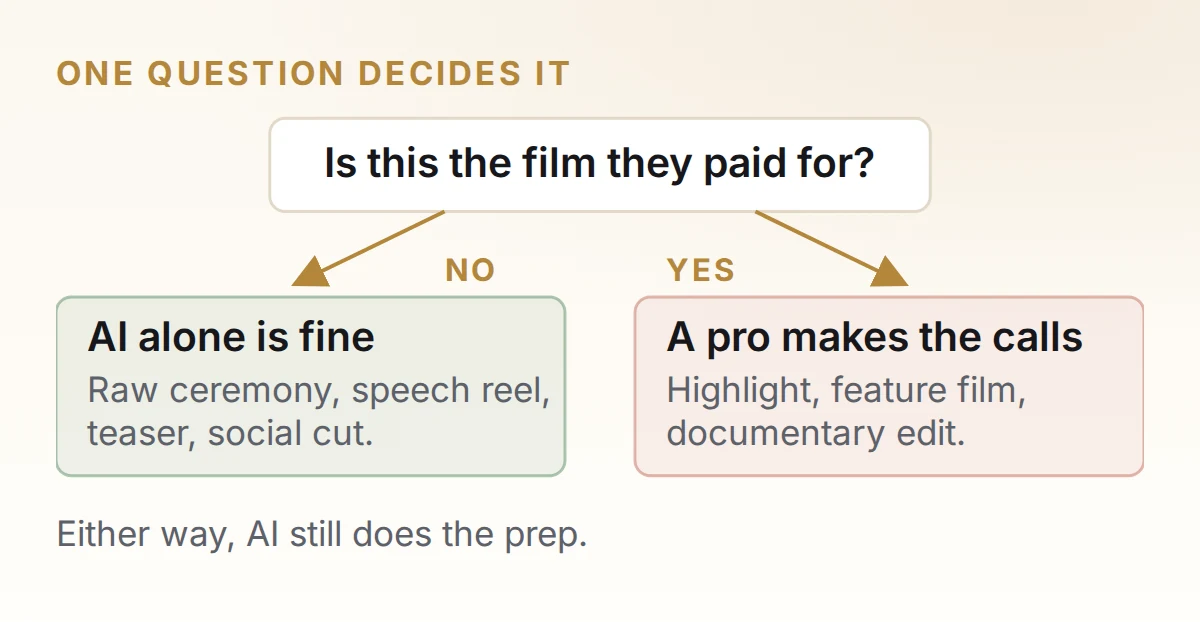
AI alone is fine for
Raw ceremony and speech deliverables. Vertical social cutdowns from a film you already cut. Same-day teasers where speed beats craft. A first-pass assembly you intend to recut yourself. None of these contain a story decision.
Outsource instead when
It's the highlight film, feature film or documentary edit. When you're backlogged in peak season. When the couple will rewatch it for thirty years. When your brand depends on the film being specific to them.
Five questions to ask any editing partner
Worth asking whoever you’re considering — us included.
- Which parts of my edit does a person actually touch? If the answer is vague, the selection is being automated.
- Do you use generative AI on client footage, and where? You want “repair only” and a clear line.
- Will you match my existing look? Ask for a short paid test edit before committing a season.
- What’s the real turnaround in peak season? Not the quiet-month number.
- Who owns the project files? You should get them back.
How Eterna Edits helps US studios and videographers
Eterna Edits is a white-label wedding video editing studio for US videographers and studios. We run exactly the split this post describes — automation on the mechanical layers, our editors on the creative ones. Everything comes back under your brand; your couple never sees us and we never contact them.
In practice that includes up to 10–12 hours of raw footage per wedding, 1–3 cameras plus drone, three revision rounds, your project files returned, and delivery from 480p to 4K. An NDA is available on request and transfers are encrypted. Our sales office is in Kalispell, Montana and the post studio is in Ahmedabad, India — which is also why a wedding sent on a Friday night is being worked on while you sleep.
If you’d rather compare options first, our round-up of wedding video editing companies in the USA lists the main ones, our pricing is published rather than quoted on request, and you can hire a wedding film editor directly if you only need occasional help. If you want to go deeper on software, see our guide to AI software for wedding video editing.
Let AI do the prep. Let an editor do the film.
Send us one wedding and see what comes back — AI on sync, transcription, cleanup and the rough cut, a professional editor on selection, pacing, music and the grade. Delivered under your own brand, matched to your style. Talk to us if you'd rather ask a question first.
Frequently asked questions
Can AI edit a wedding video by itself?
Partly. AI can take raw footage and produce a synced, color-balanced, music-cut film without you touching it. What it can't do by itself is choose which moments belong in the film, how long to hold them, or how to trim a speech so the payoff still lands. For a raw ceremony edit or a social cutdown, fully automatic is fine. For a highlight film a couple paid for, it isn't.
What are the main limitations of AI in wedding video editing?
Five recurring ones, all caused by the same gap: AI doesn't know who anyone is. It leaves creativity behind and applies an average instead of a decision. It picks the prettiest shot rather than the one that matters. It cuts on every beat instead of on meaning. It trims speeches by sentence and loses the setup a joke depends on. And it flattens skin tones when a reception mixes string lights, LED uplighting and daylight.
Will AI replace wedding video editors?
No. AI is replacing tasks inside the edit — syncing, transcribing, audio cleanup, stabilization — rather than the editor. Those were always the assistant-level parts of the job. The creative decisions that make a wedding film specific to one couple still need a person, because they depend on knowing who everyone is and what the day meant. If anything, AI makes the storytelling part of the job more valuable, not less.
Is an AI-edited wedding video good enough to deliver to a client?
Not as a highlight film. An AI-assembled cut is usually technically clean but emotionally generic — couples call it lovely and then never rewatch it. AI output is good enough to deliver as a raw ceremony or speech edit, a same-day teaser, or a social cutdown from a film you already cut. For the main deliverable, use it as a starting point and recut it.
How much editing time does AI actually save on a wedding?
Roughly four to ten hours on a typical wedding highlight film. AI collapses ingest, sync, transcription and technical repair — about 30% of the edit — but barely touches selects, story assembly and refinement, where most hours live. That's an estimate from our own workflow, not a published study. Be wary of the 60–80% figures circulating online; we couldn't trace any of them to a real source.
Can AI pick the best moments from wedding footage?
It can pick the best-looking moments, which isn't the same thing. AI ranks shots on measurable qualities — stable, sharp, faces visible, people smiling, clean audio. The moments that carry a wedding film often score badly on all of those: the parent watching from the side of the room, the half-second before someone cries, the soft handheld push-in. Selection stays a human job.
Can AI edit multi-camera wedding footage?
Yes, and this is one of its strongest areas. Waveform sync aligns three cameras plus lavs and recorders in seconds, and newer tools assemble a multicam cut automatically based on who is speaking — DaVinci Resolve's AI Multicam SmartSwitch does exactly this. For ceremonies and speeches, where you genuinely want to cut on the speaker, that output is usable with light cleanup.
Should AI-generated shots go into a real wedding film?
Use generative AI to repair what was filmed, not to invent what wasn't. Extending a shot by a few frames, painting out an exit sign, denoising a dark reception and upscaling old footage are all fine. Generating a moment nobody filmed, altering a guest's face, or fabricating drone coverage is not. The test: if the couple asked "when was that?", would you have an answer?
Can I outsource my wedding video editing to a studio that uses AI?
Yes, and it is usually the most practical option in peak season. Companies like Eterna Edits run the same split this post describes: AI handles sync, transcription, cleanup and the rough cut, while a human editor makes the moment, pacing, music and grading decisions. You get automation speed with human judgement, delivered under your own brand. Ask any studio which parts of the edit a person actually touches — if the answer is vague, the selection is being automated.
Which AI features should a wedding videographer start with?
Transcript search and speech isolation. They have the highest hours-saved-to-effort ratio of anything available, and neither touches a creative decision, so there's no risk to the film. Sync and stabilization come next.
EternaEdits Editorial Team
Eterna Edits is a white-label wedding and video post-production studio working with videographers, photographers and film studios in the USA and internationally. The team edits cinematic highlight films, documentary wedding edits, teasers and social cuts, and handles color grading and audio cleanup — all delivered under the client studio's own brand.
Sources
- Adobe — Premiere Pro release notes. Source for Media Intelligence and Generative Extend.
- Blackmagic Design — DaVinci Resolve. Source for AI IntelliScript, AI Multicam SmartSwitch, AI Audio Assistant and AI Set Extender.
Keep reading